

Environment
Custom web applications built and maintained by School of Medicine Applications & Analytics
Solution
Applications & Analytics provides technical support for web applications we’ve developed in-house for Health Sciences customers. Refer to our Application Inventory.
For help with network access, computer hardware, or desktop software, please submit a ticket to Client Services.
For non-technical support, or help with a vendor-provided web application, please consult the appropriate on-site liaison. For example. contact the Office of Medical Education for help with Leo or eCurriculum; contact the Admissions office for help with MedAdmit.
- Navigate to http://go.vcu.edu/somtech/as/ticket
- Log into the Central Authentication Service with your eID and password.
- Click VCU IT Self Service, and then Submit

- If you're submitting the ticket on someone's behalf, select Is this for someone else?

- Enter that person's name in the Who is this request for (customer)? field.

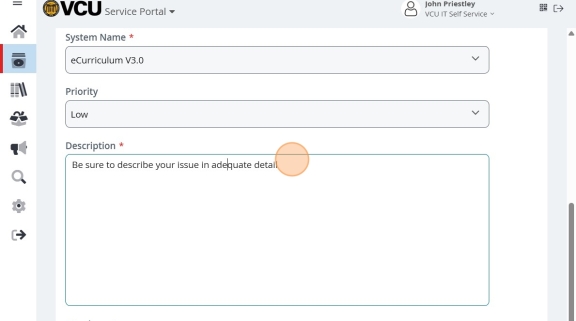
- For efficient routing, select a system in the System Name field.

- Select an accurate value for the Priority field.

- Please provide a thorough description, noting any errors you received, so that we can accurately reproduce the symptoms. Also be sure to provide full and accurate identifying information for any specific users affected by this issue. Often the issue is caused by a role or permissions issue specific to that person.
- If you have screenshots, reports, or other data that would help inform this issue, please attach files using the Upload File button.

- Click Review & Submit. If all looks good, click Submit on the review page.
